Using Javascript with HTML DOM
A Tech Talk on how javascript can interact with HTML DOM
 |
Home | HTML | Data Types | DOM | JavaScript | JS Debugging |
Following along
Remember to “git pull” on teacher repository to update to lates.
- Run this notebook in VSCode
- Activate Help-Toogel Developer Tools to add console outputs to runtime experience
Referencing HTML elements using javascript
- To get an HTML element, use
document.getElementById("idTag") - You will use the ID that you set in your HTML
- if you
console.logthe resulting variable you will get some information about the element
%%html
<!-- the ID must be specified within the element -->
<h1 id="domTitleID">My Title</h1>

<!-- javascript goes here -->
<script>
var titleElement = document.getElementById("domTitleID")
<!-- outputs h1 tag -->
console.log("Example #1, show element in DOM")
console.log(titleElement)
</script>
My Title
Getting the data within the HTML element
- The variable titleElement stores the “object”
- Basically think of this as the group of data enclosed in HTML tag
- To access a certain type of data from an “object” we use “.” notation
- .innerHTML gets data within center of tag
%%html
<!-- the ID must be specified within the element -->
<h1 id="domTitleIDget">My Title</h1>

<!-- javascript goes here -->
<script>
var titleElement = document.getElementById("domTitleIDget")
<!-- outputs h1 innerHTML from h1 tag -->
console.log("Example #2, show innerHTML")
console.log(titleElement.innerHTML)
</script>
My Title
Setting the data within the HTML Element
- The innerHTML data in this “object” can be set like a variable
- Change the value of the innerHTML using the “=” (assignment) operator
%%html
<!-- the ID must be specified on the element -->
<h1 id="domTitleIDset">My Title</h1>

<!-- javascript goes here -->
<script>
var titleElement = document.getElementById("domTitleIDset")
titleElement.innerHTML = "Set and Update My Title"
<!-- outputs h1 innerHTML after h1 tag has been updated -->
console.log("Example #3, update innerHTML")
console.log(titleElement.innerHTML)
</script>
My Title
Creating elements
- Create a new element with the document.createElement function -> takes in the type of element
- Set properties in the element just like the “h1” example
%%html
<!-- the ID must be specified on the element -->
<div id="divContainerID">
    <h1 id="h1ElementID">My Title</h1>
</div>

<!-- javascript goes here -->
<script>
   // creates a new element
   var pElement = document.createElement("p")
   pElement.innerHTML = "Starting a paragraph of text."

   // outputs p tag after it has been created
   console.log("Example #4, create a p tag within JS")
   console.log(pElement)
</script>
My Title
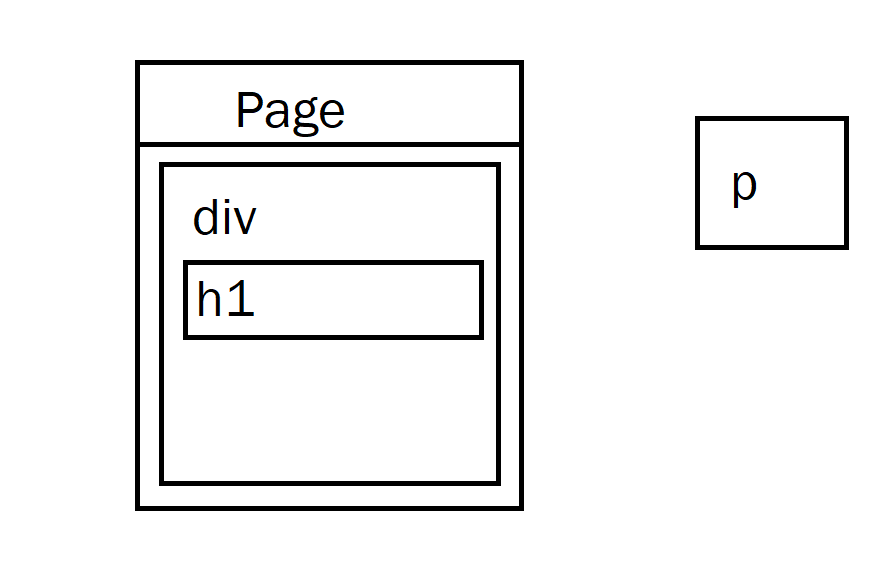
Issue! How to Create element that appears in HTML?
- Here is a visualization of what is happening => the “p” is not placed inside the HRML page!
Solution
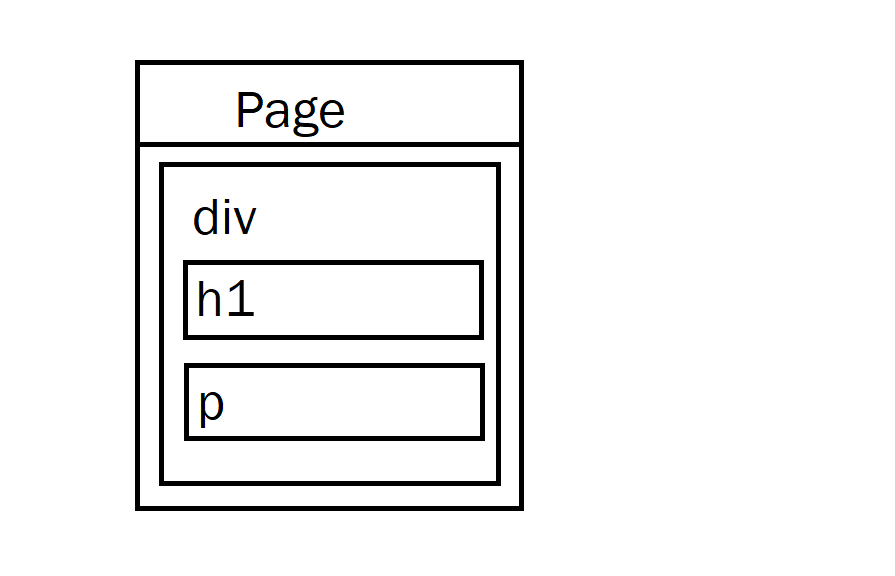
- Correct by placeing the element somewhere in the page
- For example, we could add the element within the div
- For this, use the appendChild function on the div object (the parameter would be the p element we created)
- Remember, use the getELementById to get the object for something in the html (the div!)
- Updated Diagram
%%html
<!-- the ID must be specified on the element -->
<div id="divContainerIDset">
    <h1 id="h1ElementIDset">My Title</h1>
</div>

<!-- javascript goes here -->
<script>
   // creates a new element
   var pElement = document.createElement("p")
   pElement.innerHTML = "Starting a paragraph of text."

   // outputs p tag after it has been created
   console.log("Example #5, add p tag to HTML")
   console.log(pElement)

   // place the p element inside the HTML page
   var div = document.getElementById("divContainerIDset")
   div.appendChild(pElement)
</script>
My Title
Functions in JavaScript, using with DOM
- Functions allow you to “do something”
- ex. “eat food” in a Snake Game
- Functions were used in previous examples
- console.log = “print something”
- document.getElementById = “find an element with id”
- Functions take in parameters, what to do (inside the parenthesis)
- the parameter tells console.log what to print
- the parameter in document.getElementById tells the id of the element
- Functions can be used with DOM as well, thes will be shown below
Creeating functions
- document functions functions were used to create a lot of functionality, but how can a developer create their own?
- function are useful to avoid writing the same code over and over again
- function can contain parameters for input (they effectively become variables)
- function can contain a return, the are the “output” of the function
%%html
<!-- the ID must be specified on the element -->
<div id="divContainerIDfunction">
    <h1 id="h1ElementIDfunction">My Title</h1>
</div>

<!-- javascript goew here -->
<script>
    // define a function => takes parameter text, returns a new p tab
    function createPTag(text) {
        // creates a new element
        var pElement = document.createElement("p")

        // using the parameter like a variable
        pElement.innerHTML = text

        // outputs p tag after it has been created
        console.log("Example #6, add p tag using a function")
        console.log(pElement)

        return pElement;
    }

    // using a function to create p tag
    var pTag = createPTag("Starting a paragraph with cooler text than before.")

    // place the p element in the webpage
    var div = document.getElementById("divContainerIDfunction")
    div.appendChild(pTag)
</script>
My Title
OnClick Event
- Run a function when an event occurs
- In this case, the p tag is created when the button is clicked
%%html
<!-- the ID must be specified on the elements -->
<button id="buttonID">Click here!</button>

<div id="divContainerIDbutton">
    <h1 id="h1ElementIDbutton">My Title</h1>
</div>

<!-- our javascript goe here -->
<script>
    // define a function => takes parameter text, returns a new p tab
    function createPTag(text) {
        // creates a new element
        var pElement = document.createElement("p")

        // using the parameter like a variable
        pElement.innerHTML = text

        // outputs p tag after it has been created
        console.log("Example #7.1, add p tag using a function")
        console.log(pElement)

        return pElement;
    }

    // create a function that sets specific text and adds to div
    function addPTagOnButton() {
        // using our new function
        var pTag = createPTag("Starting a paragraph with text created on button press.")

        // place the p element in the webpage
        var div = document.getElementById("divContainerIDbutton")

        // add p tag to the div
        div.appendChild(pTag)

        // outputs p tag after it has been created
        console.log("Example #7.2, update container adding a 'p' tag")
        console.log(div)
    }

    // add the P tag when our button is clicked
    var myButton = document.getElementById("buttonID")
    myButton.onclick = addPTagOnButton

</script>
Hacks
- Copy your HTML code from the HTML hacks. Write a Javascript snippet to switch the links of the two a tags when a button is pressed. Once they are switched, change the inner HTML of the top p tag to the word “switched!”
%%html
<head>
    <div id="divContainerIDbutton">
    <h1 id="h1ElementIDbutton">This is a title</h1>
    </div>
</head>
<button id="buttonID">Button yayyayay</button>
<br>
<a href="about:blank"> great link </a>
<br>
<a href="https://nighthawkcoders.github.io/teacher/"> wesrtcyvguhbijn</a>
<head>
    <div id="divContainer IDbutton">
    <h1 id="h1ElementIDbutton">This is the end</h1>
    </div>
</head>
<script>
  // Function to switch the links and change the inner HTML
  function switchLinksAndChangeText() {
      // Get the two <a> elements by their tag names
      var links = document.querySelectorAll('a');

      // Get the text of the top <p> element
      var topParagraph = document.getElementById("paragraph1");

      // Swap the href attributes of the two <a> elements
      var temp = links[0].href;
      links[0].href = links[1].href;
      links[1].href = temp;

      // Change the inner HTML of the top <p> element
      topParagraph.innerHTML = "switched!";
  }

  // Add a click event listener to the button
  var button = document.getElementById("buttonID");
  button.addEventListener("click", switchLinksAndChangeText);
</script>
%%html
<div>
    <p id="paragraph1">This is a test of paragraph 1.</p>
    <div class="button-container">
        <button id="buttonID">Test button 1</button>
    </div>
  </div>

  <div>
      <a href="https://www.apple.com/">Link 1</a>
      <br>
      <a href="https://www.formula1.com/">Link 2</a>
      <br>

      <br>
      <p>This is a test of paragraph 2.</p>
  </div>

  <script>
    // Function to switch the links and change the inner HTML
    function switchLinksAndChangeText() {
        // Get the two <a> elements by their tag names
        var links = document.querySelectorAll('a');

        // Get the text of the top <p> element
        var topParagraph = document.getElementById("paragraph1");

        // Swap the href attributes of the two <a> elements
        var temp = links[0].href;
        links[0].href = links[1].href;
        links[1].href = temp;

        // Change the inner HTML of the top <p> element
        topParagraph.innerHTML = "switched!";
    }

    // Add a click event listener to the button
    var button = document.getElementById("buttonID");
    button.addEventListener("click", switchLinksAndChangeText);
  </script>
This is a test of paragraph 1.
<style>
    .body{
      align-content: center;
      background-image: ;
    }
  </style>

  <head>
      <div>
        <h1 id="top"> SPIDERMAN VS IRONMAN </h1>
        <p id="hello">By: Soni Dhenuva</p>
        <br>
        <button id="button" class="btn btn-primary"> STAPH </button>
      </div>
      </head>
  <body id="body" background="/student/images/background1.jpg">
      <div>
        <!-- <iframe width ="560" height="315" src="https://youtu.be/zGY54qKHjuE?si=_OUhghW3Ri8-SGWc" frameborder="0" allowfullscreen> </iframe> -->
        <br>
        <a href="https://youtu.be/zGY54qKHjuE?si=_OUhghW3Ri8-SGWc" id="spiderman"> SPIDERMAN </a>
        <br>
        <img src="/student/images/Spiderman.jpg">
        <br>
        <br>
        <p> V.S </p>
        <br>
        <!-- <iframe width ="560" height="315" src="https://youtu.be/naSe2x0-VUw?si=9eraMJAb1gETJnnI" frameborder="0" allowfullscreen> </iframe> -->
        <a href="https://youtu.be/naSe2x0-VUw?si=9eraMJAb1gETJnnI" id="ironman"> IRONMAN </a>
        <img src="/student/images/ironman.jpg">
        </div>
  </body>
  <script>
    const link1 = document.querySelector('a[href="https://youtu.be/zGY54qKHjuE?si=_OUhghW3Ri8-SGWc"]');
    const link2 = document.querySelector('a[href="https://youtu.be/naSe2x0-VUw?si=9eraMJAb1gETJnnI"]');
    const button = document.getElementById('button');
    button.addEventListener('click', function () {
      if (link1.href === 'https://youtu.be/zGY54qKHjuE?si=_OUhghW3Ri8-SGWc' ) {
        link1.href = 'https://youtu.be/naSe2x0-VUw?si=9eraMJAb1gETJnnI';
        link2.href = 'https://youtu.be/zGY54qKHjuE?si=_OUhghW3Ri8-SGWc';
        document.getElementById("hello").innerHTML = "SWITCHED"
      } else {
        link1.href = 'https://youtu.be/zGY54qKHjuE?si=_OUhghW3Ri8-SGWc';
        link2.href = 'https://youtu.be/naSe2x0-VUw?si=9eraMJAb1gETJnnI';
        document.getElementById("hello").innerHTML = "SWITCHED"
      }
    });
  </script>
  File "<tokenize>", line 6
    </style>
    ^
IndentationError: unindent does not match any outer indentation level